Fallout Pip-Boy Watch Face
- 2.9
- Rating
- 100.00K
- Installs
- $1.99
- Price
 Analysis by App-foxy
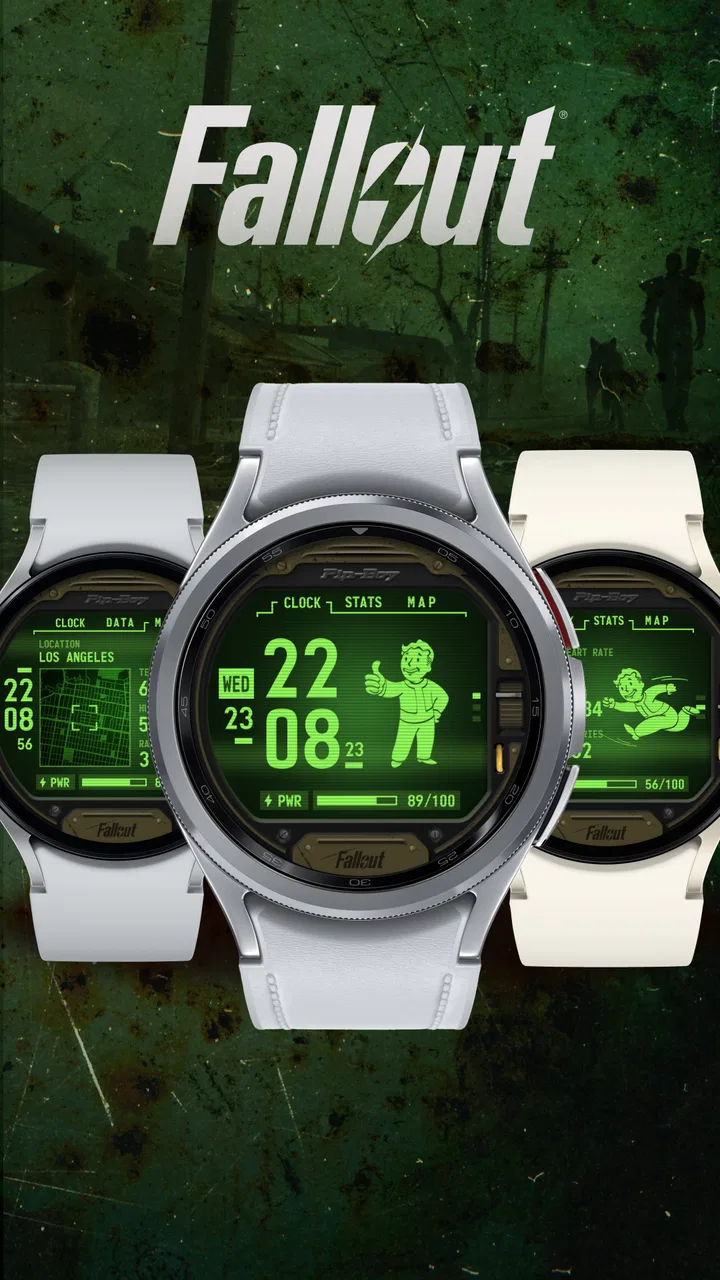
I approached Fallout Pip-Boy Watch Face as a small personalization purchase rather than a full companion app. Its purpose is straightforward: bring the recognizable Pip-Boy look to a compatible Wear OS smartwatch. That narrow focus is also its main appeal. If you want your watch to feel like a piece of Fallout memorabilia every time you check the time, this is much more distinctive than another generic digital face.
The app comes from Facer Studios and is listed in the personalization category. It costs $1.99, carries an Everyone age rating, and has reached over 100 thousand installs. Those details place it in a fairly accessible part of the watch-face market, but the average score of 2.9 from around 2.7 thousand ratings suggests that the experience is not equally smooth for everyone. I think that lower score is important context: the design can be appealing while installation, compatibility, or expectations may still cause frustration.
What the Pip-Boy style feels like on a daily watch
After using a themed watch face for a while, I find the biggest difference is not the first impression but how quickly the design remains readable during ordinary checks. A Fallout-inspired display has a strong visual identity, so it immediately makes a plain smartwatch feel less anonymous. It is a good match for someone who enjoys game memorabilia, retro-futuristic interfaces, or a watch that starts conversations without needing a case or strap covered in logos.
You May Also Like

 Blood Strike: 2.5 Anniversary
Blood Strike’s Loadouts Turn Every Drop Into a Tactical Gamble
A close look at Blood Strike’s custom loadouts: how fast access to signature weapons reshapes its battle royale rhythm, rewards preparation, and narrows the gap between fights.

 Pandora - Music & Podcasts
Pandora’s Music Is Easy to Start, but Harder to Recover
Pandora’s strength is its low-effort path from a seed to a station. Its weak spot is how much confidence it asks you to place in connection, setup, and quiet recovery.

 8 Ball Pool
 Is Built on Rivalries, Rematches, and Routine
A close look at the rivalries, rematches, shared routines, and unanswered safety questions that turn a quick pool match into a persistent mobile community.

 Samsung Music
’s Quiet Strength Is Playing What You Already Own
Its reach comes less from spectacle than from dependable access to a personal library. That simplicity is both the app’s strongest retention engine and its ceiling.

 AccuWeather: Weather Radar
AccuWeather Review: A Quick, Clear Forecast for Everyday Decisions
For everyday plans, the best forecast is the one you can understand quickly. AccuWeather makes rain timing, radar, and local conditions easy to act on, with a few trade-offs.

 Hill Climb Racing
Why Hill Climb Racing Still Turns Crashes Into One More Run
A tiny car, a bumpy hill and one more upgrade: Hill Climb Racing keeps resurfacing because its simple chaos makes every near-miss feel personal.
More From Our News Desk



The important trade-off is that a themed face is chosen for character before flexibility. A conventional Wear OS face may offer a calmer layout, broader customization, and a better fit for work, exercise, or formal clothing. This one makes more sense when the watch itself is part of your personal style. I would choose it for weekends, casual outfits, conventions, or a desk setup where the Pip-Boy appearance adds personality. I would be less enthusiastic if my only priority were maximum information density or a neutral look.
Because this is an official Fallout watch face, the attraction is the connection to that universe rather than merely a green color scheme. That distinction matters. There are many free faces that imitate old terminals, military panels, or monochrome displays, but they do not necessarily deliver the same recognizable theme. Paying $1.99 is reasonable if authenticity and presentation matter to you; it is harder to justify if you only want a green digital clock.
Where people usually get stuck
The first point of confusion is often the difference between installing an app and applying a watch face. On Wear OS, a purchase or installation may complete on the phone while the actual face still needs to be selected from the watch’s face picker or companion setup flow. If you open the phone app and do not immediately see the design on your wrist, that does not automatically mean the purchase failed.
I recommend checking the watch itself before repeating an installation. Wake the display, press and hold the current face, and look through the available choices. On some watches, the face may appear alongside other installed faces rather than replacing the current one. Selecting it from there is often more reliable than repeatedly tapping an install button on the phone.
A second source of friction is compatibility. The listing identifies this as a Wear OS watch face and gives Android 6.0 as the minimum operating-system requirement for the app. That minimum applies to the software environment, not necessarily to every watch model or every version of Wear OS. A phone can meet the requirement while the connected watch still cannot use the face properly. I would therefore verify the watch platform before paying, especially if you are using an older device or a watch with a manufacturer-specific system.
Another common mistake is expecting the phone version of the store to behave like the watch version. Wear OS products can involve two connected destinations: the phone used for discovery and the watch used for display. If the face is visible in one place but not the other, I would first confirm that the same Google account is being used and that the watch is connected before assuming the app is defective.
Simple setup checks that save time
My preferred setup order is deliberately boring. I start with the watch charged enough to remain connected, keep Bluetooth on, and confirm that the phone sees the watch normally. Then I install the face, wait for the watch connection to settle, and check the watch’s face selection screen. Rushing through those steps can leave the impression that the face is missing when the connection is simply still catching up.
If the face does not appear, I would open the watch’s installed-app or face-management area rather than immediately uninstalling everything. A restart of both the phone and watch is a sensible next step. It clears temporary connection problems without changing the watch’s broader configuration. I would also check for pending system updates, since an outdated Wear OS environment can create problems that look specific to one face.
The current version is 7.0.34_259, so seeing an older build after installation may indicate that the watch or phone has not finished synchronizing. I would give the connection a little time, keep the devices close together, and then revisit the face list. If the store shows the purchase but the watch does not, checking the account used on both devices is more useful than buying it again.
It is also worth checking the watch’s available storage if several faces and apps have been installed. A face that cannot finish transferring may not be the real problem; the watch may simply be crowded. Removing an unused face or app, restarting the watch, and trying the installation again is a safer workflow than repeatedly tapping install while nothing changes.
For a first-time Wear OS user, the most practical advice is to treat the phone as the place where you obtain the face and the watch as the place where you activate it. That mental model answers one of the main setup questions: installation and selection are related, but they are not always the same step.
Recovering the workflow when installation stalls
When a face seems stuck, I prefer a staged recovery rather than a complete reset. First, I check whether the watch is still connected and whether other watch functions respond normally. If notifications, time synchronization, or the existing face are also behaving oddly, the issue is probably broader than Fallout Pip-Boy. In that situation, restarting the connection is the sensible first move.
If everything else works and only this face is missing, I would close the store and companion screens, reopen them, and inspect the installed faces on the watch. A temporary store display problem can make a completed installation look incomplete. If the face appears but will not apply, selecting another face first and then returning to the Pip-Boy design can refresh the picker without deleting the app.
I would avoid clearing account data or resetting the watch as an early response. Those actions create much more work and can remove settings that have nothing to do with this purchase. A reset is a last resort for a larger device problem, not a normal installation step for one themed face.
There is also a useful distinction between a face that cannot be installed and a face that installs but does not look right. The first points toward connection, compatibility, account, or storage checks. The second may involve display behavior, watch configuration, or simple expectations about how a design appears on a particular screen. Separating those cases prevents unnecessary troubleshooting.
If you change watches, I would not assume that a face installed on the first device will automatically be active on the second. The new watch may need its own installation and selection process, even when the same account is present. Checking the new watch’s face list and connection status is a better starting point than treating the transfer as automatic.
When the watch or connection is the real cause
It is easy to blame the app when the watch is offline, low on storage, or running into a wider Wear OS issue. I have found that checking another recently installed face is a useful comparison. If several faces fail to load or the watch cannot update normally, the themed design is probably only exposing an existing device problem.
Display differences can also affect the experience. A face that looks crisp on one watch may feel less comfortable on another because of screen shape, brightness, or the way the manufacturer handles always-on behavior. That does not necessarily mean the app is broken. It means the same design can have a different practical result depending on the hardware.
Battery expectations deserve a realistic approach as well. Any active watch face participates in the watch’s normal display and refresh workload, but battery life is influenced by the watch, brightness, connectivity, and other settings. I would not judge this face from a single day of use. If battery life changes noticeably, compare it with another face under similar conditions before deciding that the Fallout design is responsible.
For people who depend on a watch for work alerts, fitness information, or quick access to several complications, the key question is not simply whether the face installs. It is whether the layout gives them the information they actually need. A themed face can be enjoyable yet still be the wrong daily choice if you regularly need a glanceable schedule, health data, or multiple shortcuts. In that case, a more configurable Wear OS face is likely the better tool, while this one can remain a style choice for selected days.
Who will enjoy it, and who should skip it
I think this app is best for Fallout fans who want their smartwatch to express that interest without buying dedicated hardware. It is also suitable for someone who has grown tired of polished minimalist faces and wants a display with a stronger fictional identity. The Everyone rating makes it broadly approachable from an age-classification standpoint, although the real decision is about taste and watch compatibility.
A realistic everyday scenario would be wearing it during a commute or a casual workday when you check the time repeatedly but do not need a dense productivity dashboard. The Pip-Boy theme makes those brief checks more enjoyable, and the watch feels less like a generic notification panel. Later, if you move into a meeting or need a cleaner presentation, you may prefer switching to a conventional face. That is not a failure; it is the natural compromise of choosing a highly themed design.
I would skip it if you are buying solely because you want the cheapest possible way to show time. Free alternatives can cover that need. I would also hesitate if your watch is older, your Wear OS setup is already unreliable, or you expect the phone installation to handle every step automatically. The app’s relatively modest average rating reinforces the need to be comfortable with basic setup checks rather than expecting a completely frictionless experience.
Compared with ordinary personalization apps, this purchase is more focused and less versatile. A broad watch-face platform may offer many styles and more ways to change your layout, while this design offers a specific Fallout mood. Compared with unofficial terminal-style faces, its advantage is the official theme; compared with a highly configurable utility face, its advantage is personality. The right choice depends on whether you are buying function, variety, or fandom.
My practical verdict after using it
Fallout Pip-Boy Watch Face succeeds when judged as a themed accessory for a Wear OS watch. It gives a compatible device a clear identity, costs only $1.99, and is easy to understand once you separate installation from activation. The developer, Facer Studios, has positioned it for people who want a recognizable Fallout-inspired experience rather than a general-purpose dashboard.
My recommendation is conditional but positive: buy it if the Pip-Boy look is the reason you are interested, and confirm your watch platform and account connection before expecting an instant result. After installation, check the watch’s own face picker, allow time for synchronization, and troubleshoot the connection before reinstalling. Those small habits address the most likely points of friction without risking a needless reset.
I would not call it the best universal watch face, because it is not trying to be one. The lower average rating means prospective users should keep their expectations practical, especially around setup and device-specific behavior. Still, for a Fallout fan who values atmosphere more than maximum customization, the $1.99 price is fair. Choose it for the Pip-Boy personality, not for a promise of a perfect all-purpose dashboard.
FAQs for Fallout Pip-Boy Watch Face
01What is the Fallout Pip-Boy Watch Face?
Fallout Pip-Boy Watch Face is a themed watch-face app inspired by the retro-futuristic computer interface from the Fallout universe. It is designed to give a compatible smartwatch a Vault-Tec-style appearance, usually featuring green monochrome graphics, game-inspired information panels, and a distinctive Pip-Boy layout. It is mainly intended for fans who want a recognizable Fallout look on their wrist rather than a conventional minimalist design.
02Which smartwatches and phones are compatible with Fallout Pip-Boy Watch Face?
Compatibility depends on the specific version of the app and the smartwatch platform it supports. Before downloading, check the store listing for requirements such as Wear OS, Android phone support, or compatibility with a particular watch model. Some watch faces may not work on iPhone-connected devices, older smartwatches, or proprietary systems. Installation instructions and supported devices should be reviewed carefully before purchasing or setting it up.
03How do I install and apply the Fallout Pip-Boy Watch Face?
After installing the application, you generally need to open it on the connected smartphone or smartwatch, grant any requested permissions, and follow the pairing or installation instructions. The watch face may then appear in the wearable’s available face list, where it can be selected manually. If it does not appear immediately, synchronizing the watch, restarting the companion app, or checking the device’s watch-face manager may resolve the issue.
04Does the Fallout Pip-Boy Watch Face show useful information such as time, date, battery, or steps?
The main purpose of this watch face is its Fallout-inspired visual design, but it may also display practical details such as the time, date, battery level, activity data, or other watch information. The exact elements depend on the app version and the capabilities of your smartwatch. Some displayed data may require permissions or may not update correctly on every device, so users should verify what is supported on their particular model.
05Does Fallout Pip-Boy Watch Face affect battery life or require special permissions?
Like any active smartwatch face, Fallout Pip-Boy Watch Face can have some effect on battery usage, especially if it includes animations, frequent data updates, brightness controls, or complications connected to health and activity services. It may also request permissions for notifications, sensors, or wearable data. These permissions should be reviewed before approval. If battery drain becomes noticeable, disabling animated elements or unnecessary data access may help.
Pros
- Faithfully recreates the classic Fallout Pip-Boy aesthetic.
- Quickly shows time and key watch information at a glance.
- Strong choice for Fallout fans and themed smartwatch setups.
- Retro-futuristic design stands out from standard watch faces.
- Works well as a novelty face for gaming events or casual use.
Cons
- Its highly themed design may not suit formal or professional settings.
- Small interface elements can be harder to read at a glance.
- Some features may depend on watch model or Wear OS support.
- Battery impact may vary with animations and always-on display settings.
- Limited appeal if you are not familiar with the Fallout series.

Fallout Pip-Boy Watch Face
Gallery